

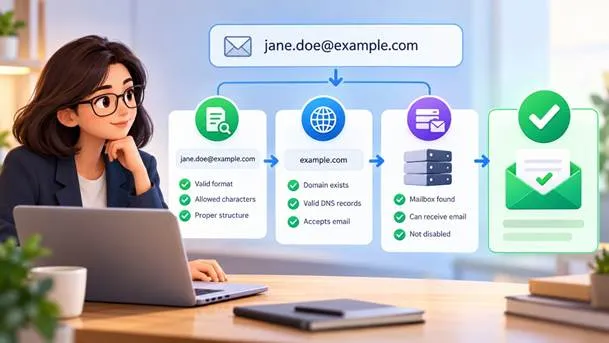
To most people, verifying a list feels like a black box: upload a file, wait, receive a report. In reality, the process is a series of simple questions asked in a sensible order. Understanding how bulk email address verification works makes the results easier to trust and much easier to act on, even if you’ve never touched anything technical. Knowing the steps takes the mystery out of the report.
Step One: Does It Look Right?
The first test is about form. An address needs one @ symbol, a name before it, a domain after it and no illegal characters or spaces. Entries like “john@@mail” or “sarah at gmail” fail here. This step is fast and cheap, so it runs on every row. It’s a bit like proofreading before sending a letter.
Syntax checks also catch the careless mistakes of data entry: trailing commas, double dots, and addresses copied with extra text. Removing them early keeps the heavier steps from wasting effort. It’s like checking that an envelope has a stamp and a legible address before sending anyone to look for the house. Plenty of bad entries die here, long before any server is contacted.
Step Two: Does the Domain Exist?
Next comes the part after the @. The check asks the internet whether that domain is real and whether it’s set up to receive mail. This is done by looking for MX records, which are public instructions that point to the servers that handle a domain’s email. Without a mail server, there’s nowhere for a message to go.
A good email list cleaning service runs these tests in the right order, so the cheap ones come first and the heavier ones only touch addresses that survive. A domain that has expired, never existed, or has no mail servers can’t accept anything, so every address on it can be marked undeliverable right away. Order matters, because it saves time and money on every run.
Step Three: Will the Server Say Yes?
The deepest check talks to the mail server directly. It starts the early part of a delivery conversation, asks whether a specific mailbox exists, and listens to the response, all without sending an actual message. A clear “no such user” answer marks the address as invalid. No message is ever sent during this conversation.
It sounds simple, but servers behave in many different ways. Some answer honestly, some refuse to say, and some delay their replies on purpose to discourage guessing. Quality tools handle those quirks carefully, retrying when needed and labeling uncertain cases instead of pretending to know. Honest labels are more useful than false certainty.
The Tricky Cases
Catch-all domains accept messages sent to any address, real or not. That means a server’s “yes” doesn’t prove the mailbox exists. Good services flag these as risky, leaving the decision to you. Treating them like confirmed addresses is a common and costly mistake. Those shades of grey are where most of the interesting decisions live.
Other special cases include disposable addresses, role accounts like info@ or support@, and mailboxes that are full. Each is technically reachable yet carries risk. Seeing them in separate categories lets you decide what to do, instead of receiving one blunt verdict that hides important differences. Separate labels give you control over how cautious to be.
Reading the Results
A typical report sorts addresses into groups such as valid, invalid, risky, and unknown. Valid ones are safe to mail. Invalid ones should leave your list. The middle categories need judgment, and the right choice depends on how cautious your campaign needs to be. Context from your own campaigns will guide the final call.
Act on the results the same day, while the list is fresh. Remove the invalid rows, segment the risky ones, and save the report for your records. Over time, comparing reports from different months shows whether your data is getting healthier or slowly sliding backwards. Over time, those reports become a record of your list’s health.
What It Adds Up To
None of these steps is magic. Each asks a plain question, and together they filter out addresses that would hurt your delivery. If you’d like to see the results on your own subscribers, mailcleanup.com makes it easy to try with a small file first.
